Wooting 60HE+: Still the Undisputed King of Competitive Gaming Keyboards?
The Wooting 60HE+ utilizes custom magnetic Hall Effect switches and Rapid Trigger firmware to deliver unmatched low latency gaming performance.

The competitive peripheral landscape changed forever when Wooting introduced magnetic Hall Effect switches to the mainstream. Suddenly, the traditional mechanical keyboard—with its static, binary actuation points—felt slow and outdated. The Wooting 60HE became an instant icon, dominating the setups of tactical shooter pros in Valorant, Counter-Strike 2, and Apex Legends.
Now, we have the Wooting 60HE+, a refined version of the classic 60% powerhouse featuring an upgraded internal layout and structural tweaks designed to make custom modding easier.
With almost every major peripheral brand—from Razer and SteelSeries to budget newcomers like DrunkDeer—launching their own magnetic “Rapid Trigger” boards, the market is crowded. Is the Wooting 60HE+ still worth its premium price tag, or has the competition caught up? Let’s dive deep into the design, performance, software, and everyday usability of this legendary keyboard.
Technical Specifications: The Specs at a Glance
Before exploring how it feels in-game, let’s look at the hardware driving the 60HE+:
| Specification | Details |
| Form Factor | 60% Compact Layout (61 Keys) |
| Switch Type | Gateron x Lekker L60 Linear Magnetic (Hall Effect) |
| Actuation Range | 0.1 mm to 4.0 mm (Fully Adjustable per-key) |
| Polling Rate | 1,000 Hz (Tachyon Mode active: sub-1ms processing latency) |
| Onboard Memory | 8 MB (Stores up to 4 profiles, 3 layers each) |
| Keycaps | Double-shot PBT (Shine-through legends, OEM Profile) |
| Mounting Style | Universal Tray Mount (GH60 compatible) |
| Internal Dampening | High-density EPDM foam with a Poron sandwich pad |
| Stabilizers | Plate-mounted (PCB supports screw-in stabilizers) |
Design and Build Quality: The Modder’s Dream
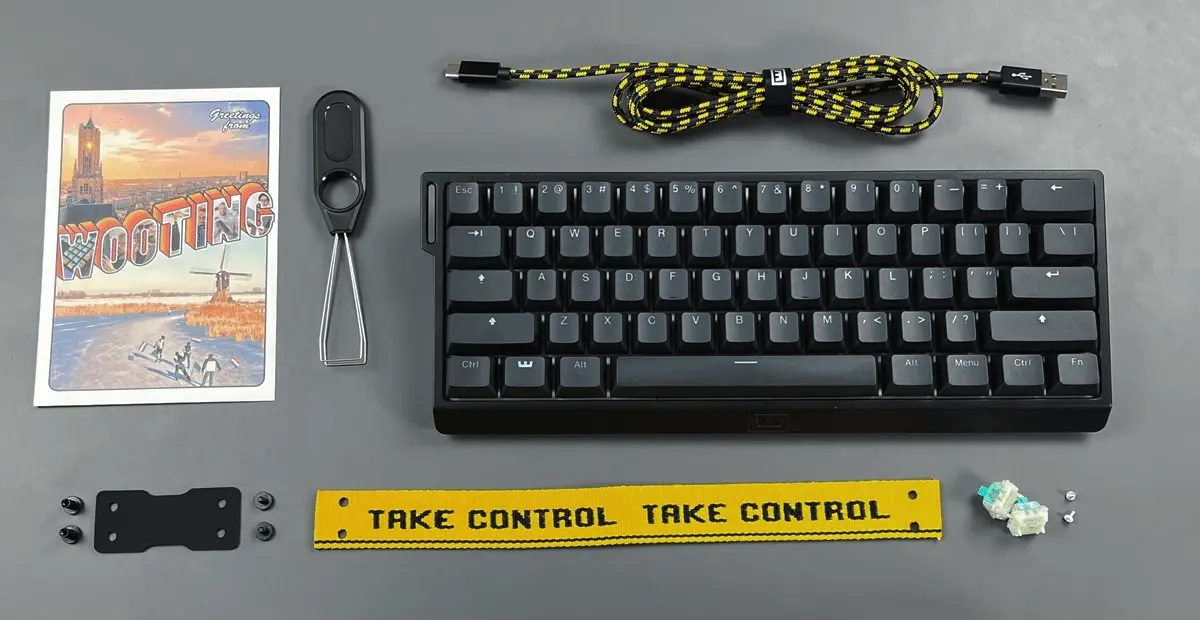
Out of the box, the Wooting 60HE+ looks unassuming. It features a minimalist, black ABS plastic chassis wrapped with a signature yellow/black nylon strap on the left side. While the plastic housing feels sturdy and is structurally reinforced by a heavy SGCC steel switch plate, it doesn’t scream “premium luxury” compared to custom CNC aluminum boards at similar price points. Weighing in at 605 grams (1.33 lbs), it is relatively light but firmly grips your desk thanks to broad rubber feet. Note that the case lacks adjustable typing angle feet, relying entirely on its native 6-degree typing incline.
Where the “+” model shines is its internal structural update. The keyboard layout follows the universal GH60 standard, but the 60HE+ features updated screw placement and structural tolerances. This change makes it easy to unscrew the entire internal module (PCB, plate, and switches) and drop it straight into premium aftermarket cases like the Tofu60. It also officially supports PCB-mounted screw-in stabilizers right out of the box, fixing a common complaint about the original version’s rattling, plate-mounted stabs.
The stock keycaps are excellent, thick double-shot PBT. They have a slight texture that resists sweat and prevents grease shine during long gaming sessions. The legends are clean, sharp, and highly translucent, evenly distributing the bright, north-facing per-key RGB backlighting controlled via the software.
The Core Technology: How Hall Effect Changes Everything
Traditional mechanical switches rely on physical metal leaves hitting each other to complete an electrical circuit. This introduces mechanical debounce delay and forces you to use a static, unchanging actuation point (usually around 2.0mm down the switch press).
Wooting swaps out physical contacts for Hall Effect magnetic sensing. Inside every Lekker L60 switch is a tiny magnet. As you press the key down, a sensor on the PCB continuously monitors the exact distance of the magnet down to 0.1mm accuracy.
Because there are no physical contacts rubbing together, the switches have a smooth, frictionless linear travel rated for an incredible 100 million keypresses. This underlying analog data opens up a suite of competitive features that traditional keyboards cannot match.
Performance and Gaming Experience
When you jump into a fast-paced game, the Wooting 60HE+ goes from a standard compact keyboard to an absolute competitive asset.
Rapid Trigger: The Game Changer
In games like Valorant or Counter-Strike 2, perfect counter-strafing is critical. To stop moving and shoot accurately, you have to let go of your movement key ($A$ or $D$) and tap the opposite key. On a standard keyboard, you have to lift the key all the way past its fixed reset point before the game registers that you stopped moving.
With Rapid Trigger, the key resets the exact millisecond you begin lifting your finger, even by as little as 0.1mm. If you change your mind and press down again, it re-actuates instantly mid-travel.
The Result: Your character stops on a dime, allowing you to hit accurate shots faster than an opponent using a traditional mechanical keyboard. It feels incredibly responsive, almost like the game is tied directly to your muscle twitches.
Snappy Tappy and Rappy Snappy
Wooting continues to update its feature set with advanced built-in SOCD (Simultaneous Opposing Cardinal Directions) resolutions:
- Rappy Snappy: Compares two bound keys (like $A$ and $D$). Whichever key is pressed down further wins out. This makes continuous, rapid strafing fluid and clean.
- Snappy Tappy: Prioritizes the absolute last key pressed. If you are holding down $A$ to move left and tap $D$ to change directions, the keyboard registers $D$ instantly without forcing you to lift your finger off $A$.
Adjustable Actuation and Analog Input
You can customize the actuation point for every single key on the board. For example, you can set your critical movement and ability keys to an ultra-fast 0.1mm while setting your Ultimate or Windows key to a deep 3.5mm to avoid accidental misclicks.
Furthermore, you can enable true analog gamepad emulation. Your WASD keys can mimic a controller’s analog thumbstick, allowing you to graduate from a slow walk to a full sprint in survival games, or gently feather the throttle and steering wheel in racing games.
Wootility: The Best Software in the Industry
Hardware is only half the battle; poor software can ruin a great peripheral. Fortunately, Wootility is widely considered the gold standard for peripheral customization software.
You do not even need to install an app on your computer. Wooting offers a web-based version (Web Wootility) that runs straight out of Chromium browsers. It uses zero background computer resources, features no annoying pop-ups, and does not require you to create an account.
Acoustic and Typing Experience
While built for gaming, the typing experience on the Lekker L60 switches is surprisingly pleasant. The linear travel feels smooth and lacks the scratchiness common in unlubed mechanical switches.
The sound profile is gentle and muted. Thanks to the pre-installed internal EPDM dampening foam and Poron sandwich pad, the harsh metallic resonance often heard on cheaper boards is well-managed. Keystrokes produce a soft, watery sound profile registering at a quiet 43 dBa from two feet away. It doesn’t quite match the marbly, deep “thock” of a hand-tuned custom enthusiast keyboard, but it is vastly superior to noisy, hollow gaming offerings from traditional mainstream brands.
The Verdict: Should You Buy It?
The Wooting 60HE+ remains a top pick among 60% gaming keyboards. It may look simple from the outside, but its analog tracking, flexible firmware updates, and reliable performance make it a standout device.
Pros
- Flawless, ultra-responsive Rapid Trigger and SOCD execution.
- Web-based software with zero bloat.
- Universal GH60 tray-mount alignment allows for easy case swapping.
- Durable double-shot PBT keycaps and a smooth, quiet linear typing feel.
Cons
- The basic ABS plastic case feels simple relative to its price point.
- No native adjustable typing angle feet.
- 60% layout requires using function layers for navigation and arrow keys.
If you are a competitive gamer looking for an out-of-the-box edge or a tech enthusiast who wants an incredible base module to build a custom aluminum keyboard, the Wooting 60HE+ is phenomenal. It delivers on its performance promises and continues to set the benchmark for the modern gaming peripheral industry.